Version 2
Build 2 · 24 October 2026midi_is_cool — Preset Designers Build
Signed macOS plug-ins in AU, VST3 and CLAP, plus two standalone instruments. Tick what you want during install.
Download for macOS, installer package, 289 megabytesFree. No account, no licence key, nothing phoning home.
Already installed it? Uninstaller (29 KB)
Notes from the designer
I've been busy making presets here along with you. Please check out what I've made, and feel free to let anything in the current preset menu spark inspiration.
I've added some new features that I wanted to see while designing sounds, and I hope it improves your designing experience like it did mine.
New — Preset Overwrite
Load a preset, make a change, hit Save. The name comes up already filled in, so one click saves over it. No retyping, no duplicate called "Harp Ensemble 2".

It is the single handiest thing in this build if you iterate the way I do.
What's new in Version 2
Three areas: sound, workflow, and a redesigned panel.
Sound and performance
- Sympathetic strings and Bloom on every engine. A new "All Engines" band holds Sympathetic, Bloom and Tone/Decay/Glide, in the same place on every page.
- Sympathetic Key and Minor. Retune the sympathetic strings to any key, major or minor.
- Glide (portamento), per voice. Off, Always or Legato — Legato slides the ringing string without re-plucking it.
- Sustain pedal (CC 64), with a PEDAL light in the header showing when it's down.
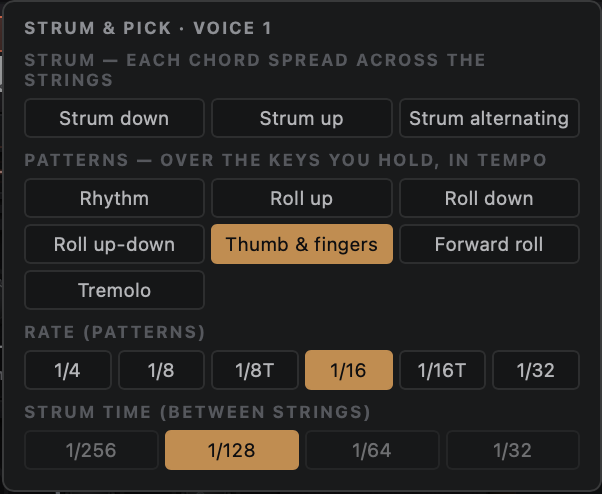
- Strum & Pick. Ten patterns synced to host tempo, with a P switch on each voice to choose which voices play them.
- Sound Design bank, second batch. 43 presets, at the levels they were designed at.


Workflow
- Preset ‹ › arrows, and save over a preset by name with a Replace check. Saves are silent.
- Right-click any section to Copy, Paste or Reset it.
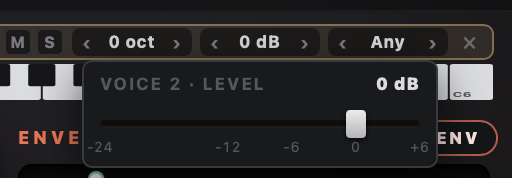
- A proper Level fader on each voice bar, in place of the old click-arrows — plus a MIDI channel menu and Octave.
- Mute and Solo per voice for split and layered setups — monitoring only, never saved.
- Info mode shows one clean tooltip at a time.
New look
- A redesigned panel.
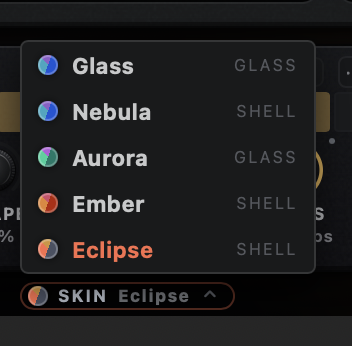
- Five new skins — Glass, Nebula, Aurora, Ember and Eclipse.
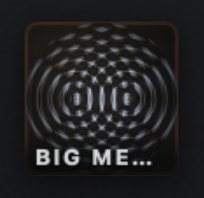
- Ripple, a new preset icon system. It analyses your preset's own output, runs it in stereo through water, captures the ripple pattern it makes, and turns that into a custom icon. Every preset, including yours, ends up with an emblem nothing else has.
Notes for preset designers
Everything you need to build a pack and send it in.
Start here
Install the build above. This is the build presets should be made against, so what you design is what everyone else hears.
Vocoder Designer and KS Explorer have the deepest preset systems and the most room to explore.
Where your presets are saved
- KS Explorer
-
~/Library/Audio/Presets/midi_is_cool/KS Explorer/Files end in .kspreset - Vocoder Designer
-
~/Library/Audio/Presets/midi_is_cool/Vocoder Designer/Files end in .vpre
In Finder, press Shift Command G and paste the path to jump straight there.
Installing Build 2 leaves this folder alone, and so does the uninstaller unless you explicitly tick the box that says otherwise. Your work stays put.
Naming your presets
Your initials, a space, then the preset name.
JB Glass Harmonic
Keeping to this means your work stays credited to you wherever it ends up.
Sending them in
Zip your presets and email them to midi_is_cool@yahoo.com.
Tell me which instrument they're for and how you'd like to be credited.
If you're planning something big, get in touch first — I'd rather talk through what a pack should cover than have you build fifty presets that overlap with someone else's.
Submission deadline
1 December 2026
Presets received by then are included in the release.